

Authored by Naga Lokesh Magham, SAP Digital Manufacturing & Practice, Körber StelliumEvery plant deals with quality deviations. What separates high-performing manufacturers from the rest isn’t whether issues happen – it’s how fast they’re caught, contained, and resolved.
Why Quality Deviations Deserve a Smarter & Quicker Response
Consistency Starts with Standardized Defect Recording
From Manual Checks to Automated Quality Enforcement
Inspection Characteristics Sync through the Order
Not All Defects Are Equal – and the System Knows It
Proven Quality in Practice
Next Step Toward Smarter Manufacturing Quality: Assess your SAP DM readiness
Why Quality Deviations Deserve a Smarter & Quicker Response
On the shop floor, defects rarely announce themselves. They surface through:
- Operator errors during manual steps
- Incorrect machine or process readings
- Insufficient processing time
- Unexpected machine breakdowns
- Material defects
- Deviations in critical process parameters
Handled the traditional way, these issues get logged manually, often well after production has moved on. That delay costs time, drives up scrap and rework, and makes root cause analysis far harder than it needs to be.
Non-Conformance Control Enables Faster Quality Response
SAP Digital Manufacturing changes this equation. Its Non-Conformance Management capability lets manufacturers record, automate, and integrate quality deviations directly into the flow of production, so problems are caught where and when they happen.
Consistency Starts with Standardized Defect Recording
SAP Digital Manufacturing connects directly with SAP S/4HANA Quality Management, so defect classifications stay consistent across the enterprise. Instead of operators typing free-text descriptions that vary from shift to shift, they select from standardized defect groups, such as:
- Operator Errors
- Machine Failures
- Material Defects
- Process Deviations
Each group carries its own set of detailed defect codes, so every issue is classified accurately and consistently. Once a non-conformance is logged, the system automatically feeds that information back into SAP S/4HANA QM, where a Quality Notification is created for follow-up action. The result is full traceability between what happens on the shop floor and how the business manages quality.
SAP documentation: transfer defect code groups and codes from SAP S/4HANA QM to SAP Digital Manufacturing.
SAP reference: SAP Digital Manufacturing Nonconformance API for logging, retrieving, and managing non-conformance records.
From Manual Checks to Automated Quality Enforcement
Manufacturers already track the parameters that matter most – temperature, pressure, weight, torque, dimensions, moisture, fill levels, and more. SAP Digital Manufacturing takes that a step further by letting teams set acceptable tolerance ranges for each one.
The moment a reading falls outside its defined tolerance, the system can automatically raise a non-conformance against the affected work order, with no manual intervention required. Quality enforcement happens in real time, rather than being discovered during a post-production inspection.
Our article on SAP DM implementation lessons from a process industry plant explores practical considerations that can influence adoption, execution, and operational performance. How it works, at a glance

Inspection Characteristics Sync through the Order
Quality planning stays where it belongs – in SAP S/4HANA. A quality engineer defines master inspection characteristics, tolerances, sampling procedures, and control keys once, at the routing or master recipe level, using standard QM master data.
The moment a Process Order or Production Order is released in SAP S/4HANA, the system automatically creates an in-process inspection lot (inspection type 03) if the material is quality-managed for that inspection origin. Because inspection type 03 is not stock-relevant, it is purpose-built for in-process checks rather than goods-receipt inspection.
Quality planning stays where it belongs – in SAP S/4HANA. A quality engineer defines master inspection characteristics, tolerances, sampling procedures, and control keys once, at the routing or master recipe level, using standard QM master data.
The moment a Process Order or Production Order is released in SAP S/4HANA, the system automatically creates an in-process inspection lot (inspection type 03) if the material is quality-managed for that inspection origin. Because inspection type 03 is not stock-relevant, it is purpose-built for in-process checks rather than goods-receipt inspection.
The order – including its operations, phases, and the inspection characteristics attached to the relevant control keys – is then replicated to SAP DM through the standard integration content. In SAP DM, these characteristics surface on the order as inspection-relevant operations, ready to be worked in the Production Operator Dashboard (POD).
What gets synchronized
- The inspection characteristics assigned to each operation, along with their specification type (quantitative or qualitative).
- Target values, tolerances, and upper/lower specification limits for quantitative characteristics.
- Valid values or attributes for qualitative characteristics.
- The control indicators that determine whether a characteristic is mandatory or optional for the operator.
In short: the quality plan travels with the order, so the operator never has to guess what to check or which limits apply – SAP DM presents it directly in context.
Recording Inspection Results in SAP DM
With the characteristics already synchronized to the order, the operator’s job becomes straightforward: follow the digital work instructions, and record a result for each inspection characteristic as the operation is executed.
Two recording patterns
- Quantitative recording – the operator enters a measured value (for example, a torque reading, weight, or dimension). SAP DM can validate the entry against the tolerance limits synchronized from SAP S/4HANA, giving instant pass/fail feedback at the point of execution.
- Qualitative recording – the operator selects from valid values or attributes (for example, “Pass / Fail” or a defined defect code) rather than entering a number.Results can be captured for a single characteristic, for a full operation, or – where inspection points are configured – at defined intervals throughout a production run, supporting statistical process control scenarios directly on the shop floor.
Synchronizing results back to SAP S/4HANA
As results are recorded in SAP DM, they are synchronized back to the corresponding inspection lot and inspection characteristic in SAP S/4HANA in near real time. This keeps the QM system as the
single source of truth for the inspection lot while SAP DM remains the system of execution for the shop floor. Recorded values update the inspection characteristic’s processing status in SAP S/4HANA. Valuation (accepted / rejected) can be automatic – based on the sampling procedure’s valuation mode – or manual, depending on how the characteristic was configured by the quality planner. Once all mandatory characteristics are processed, the characteristic – and eventually the inspection lot – can move toward completion, enabling the usage decision in SAP S/4HANA.
Extensibility is available on both sides. On the SAP S/4HANA side, existing XSLT mapping can be used, for example, to auto-complete inspection results when data arrives from SAP DM, reducing manual closing steps for high-volume, low-risk characteristics.
Integration Snapshot
| Object | Source (SAP S/4HANA / ERP) | Target (SAP DM) |
| Production / Process Order | Released order with routing / master recipe | Order replicated with operations and phases |
| Inspection Lot (type 03) | Auto-created on order release | Represented as inspection-relevant operations on the order |
| Inspection Characteristics | Defined in the inspection plan / routing operation | Downloaded and shown in the Quality Inspection Characteristic Table plug-in |
| Inspection Results | Updated via QM results recording (QE51N / Record Inspection Results) | Captured by the operator in the POD and synced back |
SAP reference: SAP Digital Manufacturing Quality Inspection API for retrieving inspection characteristics and supporting quality execution.
A scratch and a structural failure don’t call for the same response. SAP Digital Manufacturing lets organizations classify defects by severity and attach automated rules to each level:
Not All Defects Are Equal – and the System Knows It
| Severity | System Response |
| Low | Logged automatically for reporting and trend analysis |
| Medium | Routed to a supervisor for review and disposition |
| High | SFC placed on Hold until the issue is resolved |
High-severity issues can automatically place the affected production on hold, stopping defective product from moving further down the line before anyone even opens a ticket. That single control point can prevent a minor deviation from becoming a major recall.
Proven Quality in Practice
In a recent SAP Digital Manufacturing implementation at Al Hatab, we brought automated Non-Conformance Management to life, fully integrated with SAP S/4HANA QM. The result: standardized defect recording, automatic Quality Notification creation, Inspection results recording, severity-based production controls, and stronger traceability across every quality event on the shop floor.
Faster identification of production issues. Less manual effort. More consistent operator decisions. Tighter alignment between the shop floor and enterprise quality processes.
That combination is what modern quality management should look like.
Beyond the Fix – Building a Culture of Continuous Improvement
Recording a defect is only the beginning. SAP Digital Manufacturing also supports structured Issue Resolution, working hand-in-hand with SAP S/4HANA Quality Management to turn one-off fixes into lasting improvements.
Using proven methodologies like 8D Methodology, Root Cause Analysis, teams can:
- Investigate recurring quality issues at their source
- Assign corrective and preventive actions (CAPA)
- Collaborate across production, maintenance, quality, suppliers, and customers
- Track every issue from identification through closure
This is what shifts quality management from reactive paperwork to a genuine engine for continuous improvement.
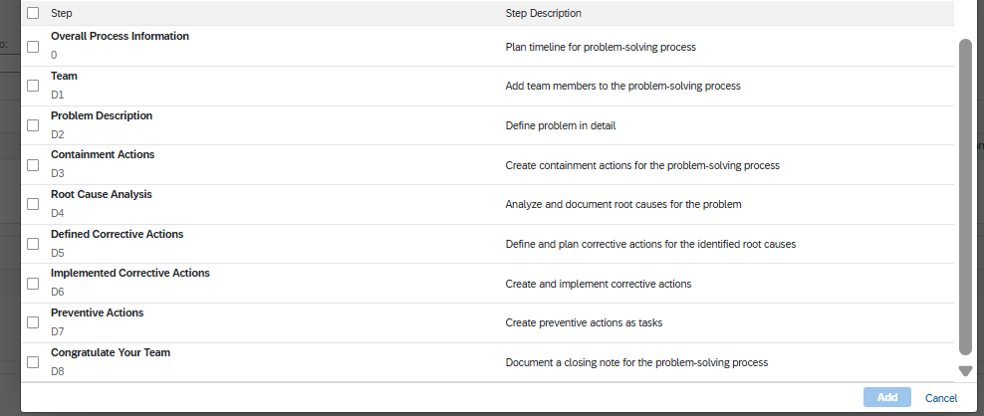
Source: SAP DM – Define problem solving methodologies App., 8D Methodology | Tools for RCA Analysis with methodologies 5 Why’s & Ishikawa (Fish – Bone Analysis).
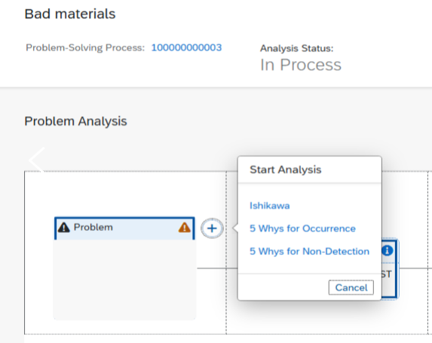
Source: SAP DM – Analysis Tool. Public SAP DM API related to Problem solving processes.
Take the Next Step Toward Smarter Manufacturing Quality
Quality can’t rest on final inspection alone. It must be built into execution itself. By bringing together standardized defect management, automated data-driven detection, severity-based production controls, and structured issue resolution, SAP Digital Manufacturing helps manufacturers catch problems earlier, respond faster, and keep getting better.
For any manufacturer serious about digital transformation, Non-Conformance Management isn’t a nice-to-have feature. It’s a core capability for cutting waste, strengthening traceability, and building a more resilient operation.
Quality into Every Stage of Production
Assess your SAP Digital Manufacturing readiness and identify the next steps toward connected, quality-driven operations. Download the SAP DM Assessment Guide
Körber Stellium helps manufacturers connect SAP Digital Manufacturing with SAP S/4HANA Quality Management to strengthen shop floor quality execution, automate non-conformance processes, and improve traceability across production operations.
From SAP Digital Manufacturing assessment and integration design to implementation and continuous improvement, our SAP manufacturing experts can help you build quality controls directly into the production process. Talk to Our SAP Digital Manufacturing Experts